
The Faire Shopify integration works with a 3PL when every system agrees on the product, unit, case pack, inventory location, order number, and fulfillment event. Most failures are not integration failures. They are mismatched catalog logic moving automatically between three systems.
Set one source of truth for every field. Test the complete order flow before volume arrives. Then run a daily exception queue so missing links, inventory drift, and fulfillment gaps get fixed before they reach the retailer.
What the Faire Shopify integration can sync
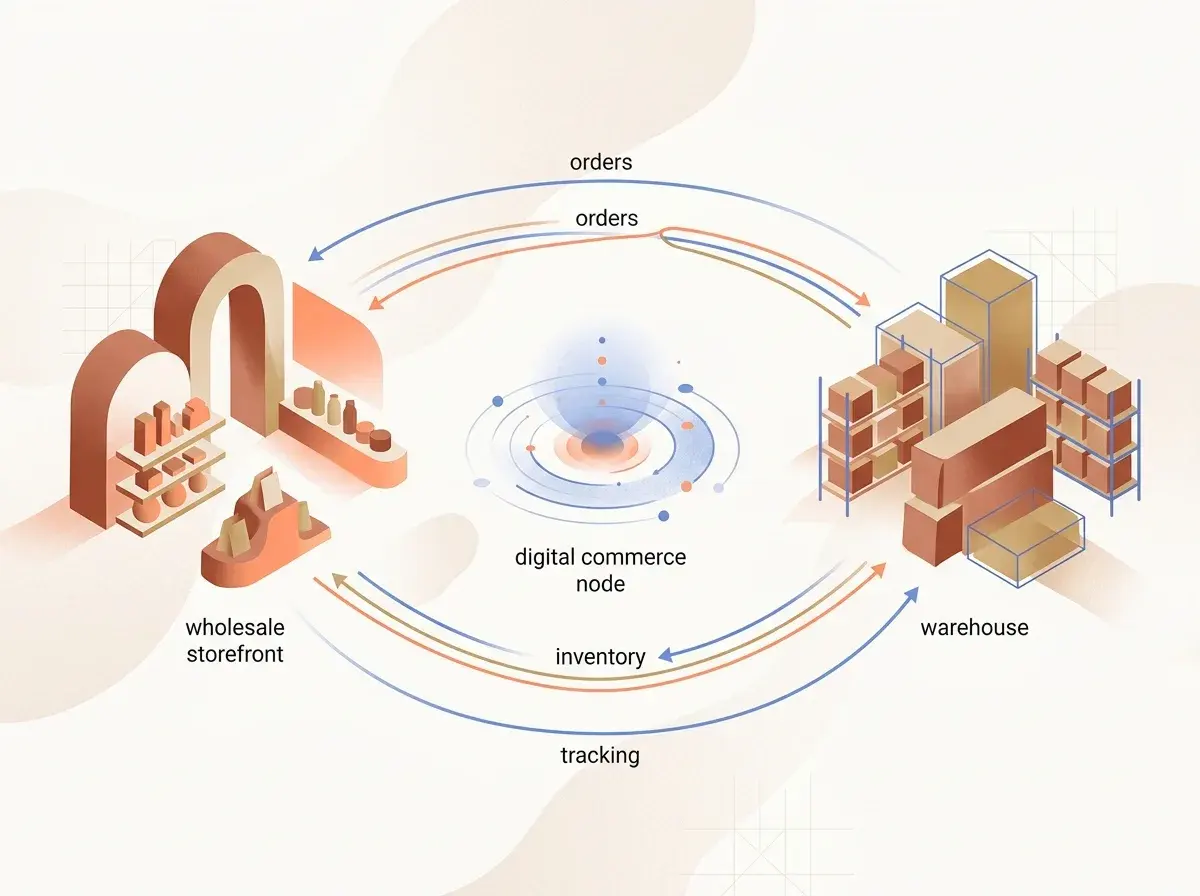
Faire's Shopify sales channel can connect catalog, price, inventory, orders, and fulfillment. Each sync has its own setting and direction. Turning on “the integration” does not mean every field now moves both ways.
The current Shopify integration overview describes these core flows:
- Catalog import from Shopify to Faire
- Inventory updates from Shopify to Faire
- Accepted Faire orders into Shopify
- Price updates from Shopify to Faire
- A Faire wholesale widget on the Shopify site
Faire currently allows one Shopify account to connect to one Faire account at a time. Multiple Shopify inventory locations can feed that connection, but the location selection needs to match where sellable wholesale inventory actually lives.
Document direction by field. “Synced” is too vague. Product content, price, inventory, orders, cancellations, and fulfillment can have different directions, triggers, and failure states.
Choose a source of truth for every field
Build a simple system map before configuration.
| Field | Source of truth | Destination | Trigger | Exception owner |
|---|---|---|---|---|
| SKU and variant | Shopify or ERP | Faire | Product publish or content sync | Ecommerce |
| Wholesale price | Shopify or Faire | Faire | Price sync or manual update | Finance |
| Case size | Catalog master | Faire and 3PL | Product setup | Operations |
| Available inventory | Shopify location | Faire | Inventory sync | Operations |
| Accepted order | Faire | Shopify and 3PL | Order acceptance | Customer operations |
| Tracking | 3PL or Shopify | Faire | Fulfillment sync | Logistics |
Fill this table with named owners. Two systems cannot both be authoritative for the same field without a conflict rule.
Product content needs special care. Faire's product content sync guide says enabled fields from Shopify can overwrite existing Faire titles, descriptions, images, SKU, GTIN, tariff code, weight, and country-of-origin data. Those fields become locked on Faire while the setting is enabled.
That can simplify maintenance. It can also overwrite Faire-specific buyer copy. Decide whether one cross-channel description is acceptable before enabling it. The Faire SEO guide explains why wholesale content often needs a different job from consumer copy.
Match products and variants before inventory
Inventory sync depends on accurate product links. Faire can attempt automatic matching when the Shopify SKU is exact and unique. Products or variants without a valid match need manual linking.
Use unique SKUs across every sellable unit. Avoid reusing a parent SKU for several sizes or flavors. Confirm that archived products, testers, bundles, and seasonal variants have an intentional state in each system.
Run a link audit with these checks:
- Every active Faire product maps to the intended Shopify product.
- Every active variant maps to the correct size, flavor, or format.
- The selected Shopify inventory location is the location the 3PL updates.
- Discontinued items cannot receive new inventory accidentally.
- Testers and samples deduct inventory according to the chosen setting.
- SKU changes have a controlled migration plan.
Faire's inventory sync documentation identifies missing product links, missing variant links, and incorrect location selection as common reasons inventory does not update.
Opener connects wholesale order history, buyer conversations, account health and next actions so your team can review the work each relationship needs.
Book a DemoResolve unit and case-pack logic
Faire tracks products at the individual-unit level, even when the retailer orders full cases. Shopify catalogs can track either individual units or whole cases. The integration needs to know which model each product uses.
Faire's case-pack integration guide explains the conversion:
- When Shopify tracks individual units, price and inventory can sync directly while Faire's case size controls order multiples.
- When Shopify tracks whole cases, Faire divides the Shopify case price by case size to create a unit price and multiplies case inventory by case size to create unit inventory.
- Mixed catalogs require the correct selling method for each product.
Example: Shopify holds 100 cases, each with six units. If the product is configured “by the case,” Faire should show 600 individual units. A retailer ordering two cases appears as 12 units on Faire and converts back to two case quantities in Shopify.
Test this with a real low-value order. Verify price, ordered quantity, inventory deduction, pick quantity, and retailer invoice. A case mismatch can create six times too much or too little inventory with no technical error message.
Route accepted orders into the 3PL
Faire orders sync to Shopify after the brand accepts them. The synced order can include line items, promotion, commission and processing fees, Faire order number, expected ship date, customer and shipping information, tags, and eligible retailer email data.
Configure the Shopify order so the 3PL can recognize it:
- Apply consistent
FaireandWholesaletags - Choose an order naming convention
- Preserve the Faire order number in order notes or a mapped field
- Map the expected ship date to the 3PL service-level field
- Keep discounts and marketplace fees out of the merchandise quantities
- Route wholesale orders to the correct warehouse location
- Prevent consumer inserts or DTC packing logic from applying automatically
Faire's order sync guide notes that Faire and Shopify order numbers use different formats. Preserve both. The Faire number is the shared key for support, warehouse exceptions, and platform reconciliation.
Do not let every accepted order release instantly if operations still need to review stock, requested ship date, or special notes. Use a controlled hold when necessary, but define who releases it and how quickly.
Sync inventory only when the full loop works
Inventory sync updates Faire from selected Shopify locations. To deduct Shopify inventory when a Faire order is placed, Faire says both inventory sync and order sync must be enabled and the product must be linked.
The complete loop is:
- The 3PL reports available inventory to Shopify.
- Shopify exposes the selected location to Faire.
- Faire receives the updated unit inventory.
- The brand accepts a Faire order.
- The order moves into Shopify.
- Shopify deducts the linked inventory.
- The order reaches the 3PL for allocation and picking.
Audit overselling risk around delays between steps. Reserve safety stock for DTC spikes, wholesale samples, damage, and orders still waiting for acceptance. The correct buffer depends on sales velocity and sync latency.
The first 90 days playbook keeps launch volume controlled while this loop earns trust.
Do not turn on inventory sync before validating case packs and locations. Automation makes a correct catalog faster. It makes an incorrect catalog dangerous.
Configure fulfillment and tracking direction
Faire supports fulfillment information moving from Faire to Shopify, from Shopify to Faire, or both ways under the available settings. The current fulfillment sync guide says Shopify-to-Faire tracking sync requires fixed-rate shipping. Orders without an applicable fixed rate may still require manual tracking updates.
Choose one normal path. If the 3PL fulfills in Shopify, Shopify should send the carrier and tracking event back to Faire when the configuration supports it. If fulfillment starts in Faire, ensure Shopify and the 3PL do not create a second shipment.
For multi-parcel orders, confirm every tracking number reaches Faire. The retailer needs visibility into the complete shipment, and operations needs a way to distinguish a late parcel from a missing case.
Test cancellations, partial fulfillment, replacements, address changes, and split shipments. The happy path is only one part of wholesale operations.

Give the 3PL a Faire-specific pack standard
The warehouse needs a written standard for Faire orders. Include:
- Pick by the correct unit or case quantity
- Preserve retailer and Faire order identifiers
- Use the approved wholesale carton and protection
- Include the Faire packing slip inside the box
- Exclude consumer promotions unless explicitly approved
- Record lot or expiry information when the category requires it
- Add every parcel and tracking number
- Photograph high-risk or fragile shipments when useful for claims
Faire lets brands configure packing-slip sorting, product images, and a review QR code. Its packing-slip guide explains those options. Its shipping guidance says the packing slip belongs inside the box, not on the exterior.
If the 3PL creates its own document, verify that it satisfies the current order requirement before replacing the Faire slip. Do not rely on an informal workaround as policy.
Run a daily exception queue
Automation needs an owner. Review these exceptions every business day:
- Accepted order missing from Shopify
- Shopify order missing from the 3PL
- Unlinked product or variant
- Negative or implausible Faire inventory
- Price or case quantity mismatch
- Order held past the expected release time
- Shipment missing tracking
- Partial or split order with incomplete parcel data
- Cancellation present in one system only
- Damaged or missing units awaiting resolution
Measure exception age, not only count. A problem cleared in 20 minutes is different from one discovered after the retailer asks where the order went.
The Faire marketplace data guide should sit beside the operational queue. Conversion and reorder analysis only works when order, product, and account data remain trustworthy.
Reconcile the channel every month
Compare Faire, Shopify, warehouse, and finance records monthly.
Reconcile:
- Accepted order count and merchandise subtotal
- Discounts, commission, and processing fees
- Units ordered, shipped, cancelled, damaged, and replaced
- Inventory by SKU and location
- Carrier cost and shipping reimbursement
- Payout amount and timing
- Account-level contribution
Use the Faire unit economics model to convert the reconciliation into contribution margin. Small quantity or fee errors compound quickly across a large order book.
Then review service outcomes. Late shipment rate, shortage rate, damage rate, cancellation rate, and response time tell you whether the integration is helping the retailer experience.
Connect fulfillment with retention
Clean fulfillment is the first account-management action. A retailer who receives the correct product on time starts the relationship with trust. A retailer who chases missing cases does not want a reorder reminder next.
Send delivery follow-up only after tracking and exception data agree. Resolve service issues first. Then move the account into the Faire reorder system with the actual assortment and ship date.
No duplicate orders. No inventory guessing. No conflicting tracking updates. The right operating model gives every system one job and every exception one owner.
Build a Faire operation that stays boring
The Faire Shopify integration should make wholesale fulfillment predictable. Define the source of truth, match every variant, validate case math, test order and fulfillment direction, and give the 3PL a specific pack standard. When the daily queue stays quiet, the retailer gets the experience that earns the next order.
Opener works your wholesale book daily, watches reorder cadence, and revives the accounts that have gone quiet.
Book a Demo